Crystal Count
18 screens. AI receipt scan. Oman VAT built-in. Multi-company. Complete accounts management � designed for business owners, not accountants.
Your Business. Your Books.
Crystal Clear.
Crystal Count is a complete accounts management system for small and medium businesses across Oman. Every screen is written in plain language � "Record Income" instead of receipt voucher, "Record Expense" instead of payment voucher. You don't need to understand double-entry bookkeeping to keep accurate books.
Modern Digital World LLC sets up your chart of accounts, fiscal year, opening balances, and VAT configuration before you make your first entry. Go live in days.
Request a Free Demo18 Modules Included
Four Things That Cover Every Money Move.
Every financial transaction in your business falls into one of four categories. Crystal Count gives each a plain-language name and a focused screen � no jargon, no confusion.
Record Income
Receipt VoucherMoney came in � a customer paid cash, a client settled by bank transfer, or a cheque was deposited. Select the account it came from, the bank or cash account it went to, and the amount.
Record Expense
Payment VoucherMoney went out � a supplier invoice was paid, the electricity bill was settled, or staff salaries were transferred. Log the payee, the expense account, and the amount paid.
Move Between Accounts
Contra VoucherCash was deposited to the bank, or cash was withdrawn from the ATM. No expense, no income � just money moving between your own accounts. One screen, two account fields, done.
Journal Entry
Advanced / AdjustmentsFull debit and credit control for accountants. Used for period adjustments, depreciation entries, accruals, and any entry that doesn't fit the three screens above. Dynamic multi-line layout with running balance check.
Photograph a Bill.
Done.
Crystal Count's AI Scan reads any invoice or receipt using your camera. It extracts the vendor name, date, amounts, and VAT � and builds the complete journal entry for you. You review and post. No typing numbers manually.
Photograph the Bill
Open AI Scan. Take a photo using your device camera or upload an image. Electricity bills, supplier invoices, petrol receipts, purchase invoices � any document works.
AI Reads the Document
Anthropic Claude AI analyses the image. It identifies the vendor, invoice date, net amount, VAT amount, and total � and maps each figure to the right account automatically.
3-Line Entry Built
A balanced journal entry is created: expense account debited for the net, VAT input account debited for the tax, and payable or cash account credited for the total.
Review & Post
Confirm the suggested entry on screen. Adjust any field if needed. Post to the ledger � or save as a draft for manager approval before it hits the books.

Every Entry Reviewed
Before It Hits the Books.
Crystal Count uses a two-step posting workflow. Staff save entries as drafts. A manager or accountant reviews the pending list and approves each entry before it is posted to the ledger permanently.
Once posted, entries cannot be deleted � they can only be reversed. This keeps your audit trail clean and your books trustworthy at all times.
- Entries saved as drafts until approved
- Manager reviews pending queue before posting
- Bulk approval or individual post per entry
- Posted entries reversed � never deleted
- Full audit trail with user and timestamp
- Unposted transaction report at any time
Save as Draft
Staff enter the transaction and save. No impact on ledger until the entry is reviewed and approved.
Manager Approves
Manager opens the pending queue, reviews the entries one by one or selects all, and posts them to the books.
Posted = Permanent
A posted entry is locked. The only correction path is a reversal entry, which creates an offsetting record in the same period.
Reversal Not Delete
Mistakes happen. Crystal Count creates a mirror entry with the opposite amounts � both the original and reversal remain visible forever.
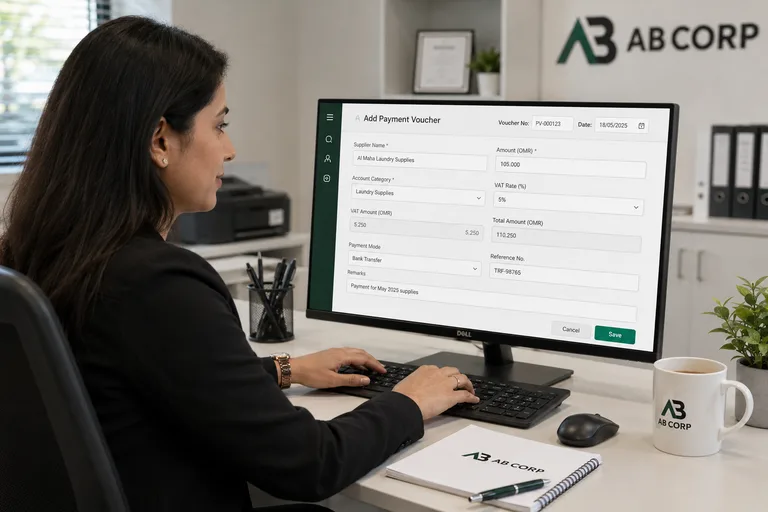
5% VAT.
Built In. Always On.
Crystal Count has Oman's VAT framework embedded at the account level. Every income and expense entry splits the net amount from the VAT component automatically � no manual calculation, no separate worksheet, no risk of errors at filing time.
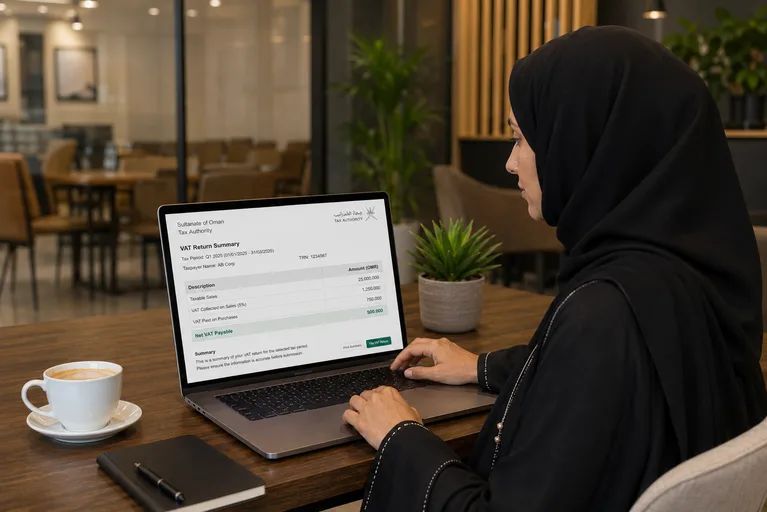
The VAT Report summarises output VAT collected and input VAT paid across any date range, and calculates the net VAT payable. When your quarterly filing is due, the numbers are ready.
Output VAT � Income Side
When you record income that includes VAT, Crystal Count separates the revenue from the VAT collected. The VAT amount flows into your Output VAT account and appears in the VAT Report as tax you owe to the authority.
Input VAT � Expense Side
When you record an expense that includes VAT, the VAT portion is captured in your Input VAT account. This is the tax you have already paid on purchases � and it reduces your net VAT payable at filing time.
Net VAT Payable
Output VAT minus Input VAT � the final number you remit to the Oman Tax Authority. Crystal Count calculates this automatically for any period. No spreadsheet gymnastics required.
Eight Reports.
Every Answer You Need.
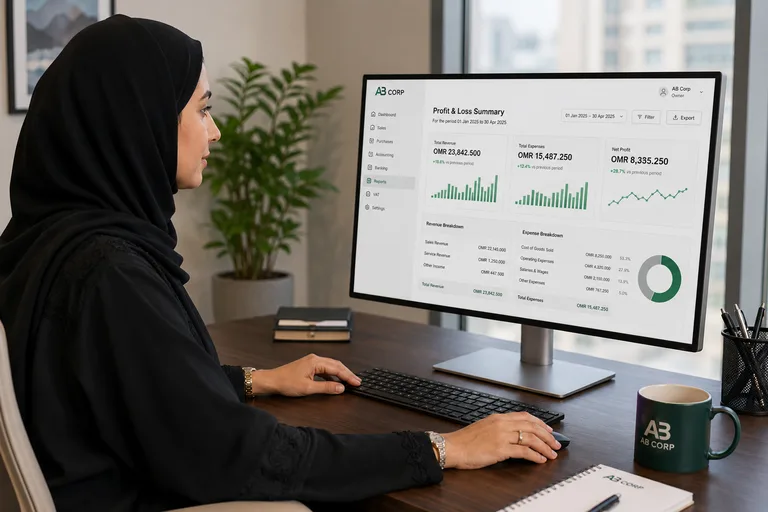
Crystal Count produces the eight essential financial reports every business needs � from a daily transaction log to a full balance sheet. All filterable by date range, company, and branch.
Day Book
Every transaction posted in a selected period � date, reference, accounts, and amounts. The starting point for any financial review or audit.
Account Ledger
All movements for a single account over a date range. Opening balance, debits, credits, and running balance after every transaction.
Account Statement
A clean, shareable statement for any account � formatted for your bank, auditor, or supplier. Includes opening balance, all transactions, and closing balance.
Trial Balance
All accounts with their debit and credit totals � the check that confirms your books are balanced. Opening, period movement, and closing columns at a glance.
Profit & Loss
Income minus expenses for any period. Organised by account type � Revenue, Cost of Sales, Direct Expenses, Indirect Expenses. Clear net profit at the bottom.
Balance Sheet
What your business owns (assets) and what it owes (liabilities and equity) at any point in time. Side-by-side or stacked layout. Printable for bank or auditor submissions.
Income & Expense
A summary view grouping all income categories and all expense categories. Quick comparison of cash in vs cash out for any period � without going into full P&L detail.
VAT Report
Output VAT collected, input VAT paid, and net VAT payable calculated automatically. Formatted for the Oman Tax Authority quarterly filing requirement.
Set Up Once.
Run for Years.
Crystal Count's setup screens are configured by Modern Digital World LLC before you start. Chart of accounts, fiscal year, periods, and opening balances are all in place when you log in for the first time.
Chart of Accounts
Standard Oman chart with Assets, Liabilities, Equity, Revenue, and Expense accounts. Add or modify accounts at any time. Group-level and sub-account structure supported.
Fiscal Year Setup
Define your financial year start and end date. The system auto-creates 12 monthly periods. Multiple fiscal years can be active � useful during year-end transitions.
Period Locking
Lock any period to prevent backdated entries. Once locked, no new transactions can be posted to that month. Unlocking requires manager-level access � protecting the integrity of your closed books.
Opening Balance
Enter opening balances for all accounts at the start of a fiscal year or at go-live. The system checks that total debits equal total credits before allowing you to proceed.
Multi-Company
Run multiple companies under one installation. Each company has its own chart of accounts, branches, fiscal year, and user rights. An accountant can manage several clients from one login.
Multi-Branch
Add branches per company. All transactions carry a branch code. Reports can be filtered by branch or rolled up to company level � giving both branch managers and owners the view they need.
Windows. Browser. Any Desk.
Windows Desktop App
Crystal Count runs as a full Windows application on your desktop or laptop. Fast, offline-capable, and familiar for your accounting team.
Web Browser Access
Owners and managers access reports, dashboards, and approval queues from any browser � without installing anything. View the books from home or on the road.
AI Scan on Any Device
The AI Receipt Scan screen works on any device with a camera. Staff photograph bills on a phone or tablet and the entry is queued for approval instantly.
SQL Server Database
Data is stored in Microsoft SQL Server � the most trusted database for business applications. Can be hosted locally on your server or on a cloud instance.
Role-Based Access
Each user is assigned a role. The cashier who records income sees different screens than the accountant who reviews the trial balance. Sensitive reports are restricted by default.
Print & Export
Every report and voucher can be printed directly or exported. Balance sheets and P&L reports print in a clean layout ready for bank or auditor submissions.

Simple. Straightforward. All-In.
One subscription covers all 18 modules � chart of accounts, AI receipt scan, VAT report, and every financial report. No per-user fees, no locked reports.
Contact Us for Pricing
Pricing is based on your company setup � number of companies, branches, and users. Request a free consultation and we will walk you through the full platform and give you a tailored quote.
Request a Demo & QuoteQuestions Before You Decide
No. Crystal Count uses plain language throughout � "Record Income" instead of receipt voucher, "Record Expense" instead of payment voucher, "Move Between Accounts" instead of contra entry. Each screen has focused fields for exactly what it needs. You don't need to understand debit and credit rules to keep accurate books. Accountants can still use the full Journal Entry screen for adjustments, but day-to-day recording requires no accounting background.
Open the AI Scan screen and take a photo of any invoice or receipt � electricity bill, supplier invoice, purchase receipt, fuel receipt, or any commercial document. Anthropic Claude AI reads the vendor name, date, total amount, and VAT amount from the image and builds a three-line journal entry automatically: the expense account is debited for the net amount, the VAT input account is debited for the tax portion, and the payable or cash account is credited for the total. You review the suggested entry on screen, adjust any field if needed, and post it. No manual typing of numbers required.
Yes. Crystal Count has Oman's 5% VAT built into the chart of accounts. Every income and expense entry separates the net amount from the VAT component automatically � you enter the total, the system calculates the split. The VAT Report shows output VAT collected, input VAT paid, and the net VAT payable for any date range. When your quarterly filing is due, the numbers are already calculated and formatted for the Oman Tax Authority.
Yes. Crystal Count supports multiple companies under one installation, each with its own chart of accounts, fiscal year, branches, and user access rights. An accountant managing several client businesses can switch between companies without logging out. Each company's data is completely separate � reports, balances, and settings do not cross between companies.
Crystal Count includes eight financial reports: Day Book (all transactions for a period), Account Ledger (every movement for a single account with running balance), Account Statement (formatted for banks and auditors), Trial Balance (debit and credit totals for all accounts to confirm books are balanced), Profit & Loss (income vs expenses by account type), Balance Sheet (assets vs liabilities and equity at any date), Income & Expense Summary (grouped cash in vs cash out), and VAT Report (quarterly tax filing). All reports are filterable by date range, company, and branch, and can be printed or exported.
Yes. Crystal Count uses a fiscal year and monthly period structure. Once the manager locks a period, no new transactions can be posted to that month � regardless of the date entered. This prevents accidental backdating and ensures closed periods remain final. Unlocking a period requires manager-level credentials. Mistakes in closed periods are corrected with reversal entries, not deletions � so the audit trail is never broken.